AI agents are taking real action across the enterprise, and that requires a new level of oversight. The blog post, "Powering Frontier Transformation with Copilot and agents," explores how Agent 365 in Microsoft 365 Enterprise 7 helps organizations keep agents under control by extending familiar Microsoft Security solutions--Defender, Entra, and Purview--to govern, secure, and observe agents alongside users. Read the blog post to discover how Microsoft is simplifying agent management so organizations can scale AI responsibly, with trust and visibility built in from the start.
What is Wave 3 of Microsoft 365 Copilot and how is it different?
Wave 3 of Microsoft 365 Copilot is a new release that moves Copilot from simple “prompt and reply” assistance to more agentic, multi-step work embedded directly in the tools your teams already use.
Key changes in Wave 3:
- Copilot Cowork: Lets you delegate longer-running, multi-step tasks instead of just asking for a single draft or answer. Cowork can break down complex requests, reason across tools and files, and carry work forward over minutes or hours, with visible progress and opportunities for you to steer.
- Multi-model intelligence: Copilot now uses leading models from multiple providers, including the technology that powers Claude Cowork and the latest OpenAI models. It automatically selects the right model for the task, so users don’t have to think about model choice.
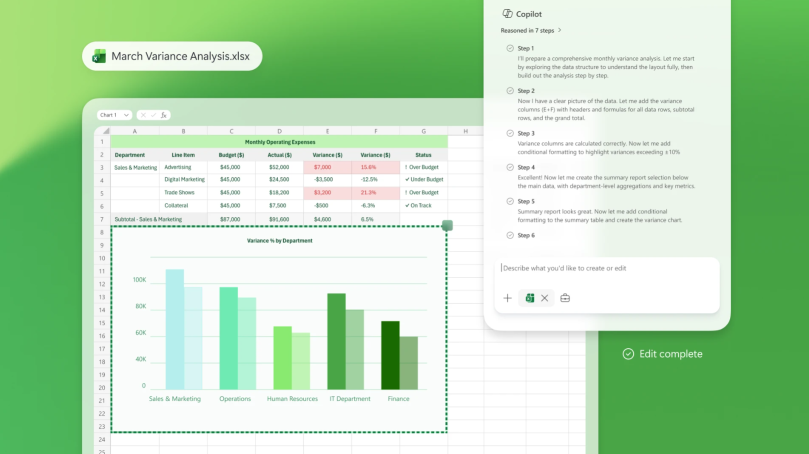
- Deep integration with Microsoft 365 apps: Wave 3 embeds these capabilities directly into Word, Excel, PowerPoint, and Outlook. Copilot can create, edit, and refine content end-to-end inside documents, spreadsheets, presentations, and email—using your real formulas, layouts, brand kits, and sensitivity labels.
- Chat as a starting point for work: In Copilot chat, people can start with a question or idea and turn it into documents, spreadsheets, presentations, or actions like scheduling meetings or sending emails—without switching tools.
From an IT and governance perspective, Wave 3 is designed for enterprise use:
- It enforces existing Microsoft 365 permissions, sensitivity labels, and tenant-level controls.
- Files are saved to OneDrive and SharePoint, so governance, audit, compliance, and retention policies still apply.
- All of this runs within Microsoft’s security, identity, and governance framework.
In short, Wave 3 reimagines Copilot as an embedded, multi-step work partner that operates across your apps, grounded in your enterprise context and controls.
How do Copilot Cowork and agents help my teams get real work done?
Copilot Cowork and agents are designed to move beyond one-off prompts and help teams execute real workflows from start to finish.
Here’s how they show up in daily work:
- In Word: Copilot can refine a rough draft into a polished document, update content based on the latest meetings and files, and keep everything aligned with your organization’s style and sensitivity labels.
- In Excel: It can improve spreadsheets using real formulas, not just static numbers, and help analyze data in context so teams can move from raw data to insights faster.
- In PowerPoint: Copilot can build slides that match how your organization actually designs decks, including layouts, object styles, and brand kits—reducing manual formatting work.
- In Outlook: It drafts and refines emails directly in the app, helping teams respond faster while staying on message and on policy.
Copilot chat becomes the conversational hub for work:
- You can start with a question or idea in chat and ask Copilot to create a document, spreadsheet, or presentation from that conversation.
- From chat, you can also schedule meetings or draft and send emails to your team without copying and pasting between tools.
- Built-in agents for Word, Excel, PowerPoint, and Outlook let you move smoothly from chat into app-native work.
Copilot also connects to your broader ecosystem:
- It surfaces insights from Dynamics 365, custom apps built with Power Apps, and partner tools like Adobe, Monday.com, and Figma directly in chat.
- Employees can build their own task-focused agents with Agent Builder, while IT and business leaders can create more advanced process agents (for example, onboarding or procurement) using Microsoft Copilot Studio.
All of this is designed to be observable, governable, and secure at enterprise scale, so teams can rely on agents for everyday work while IT keeps control.
How can IT govern AI agents at scale, and what are Agent 365 and Microsoft 365 E7?
As AI agents become part of everyday work, the challenge shifts from pilots to operating them safely and efficiently at scale. Industry research from IDC projects that the number of agents in enterprises will grow by an order of magnitude, reaching 1.3 billion AI agents by 2028. That scale requires a clear control plane.
Agent 365 is designed as that control plane:
- Gives IT and security leaders one place to observe, secure, and govern every agent across the organization.
- Extends existing processes used for employees to agents, using familiar tools like the Microsoft Admin Center and security solutions such as Defender, Entra, and Purview.
- Helps organizations move from experimentation to enterprise-scale operations without rebuilding infrastructure or weakening security posture.
- Will be generally available on May 1, priced at $15 per user per month.
Microsoft 365 E7: The Frontier Suite brings the productivity and governance pieces together:
- Equips employees with AI across email, documents, meetings, spreadsheets, and business apps via Microsoft 365 Copilot.
- Provides IT and security teams with the observability and governance needed to operate AI and agents at scale.
- Includes: Microsoft 365 Copilot, Agent 365, Microsoft Entra Suite, and Microsoft 365 E5 with advanced Defender, Entra, Intune, and Purview capabilities.
- Will be available for purchase on May 1 at a retail price of $99 per user per month, with options available with or without Teams.
Together, Agent 365 and Microsoft 365 E7 help organizations:
- Standardize how agents are managed, secured, and audited.
- Apply consistent identity, policy, and observability across both users and agents.
- Scale AI across the workforce without compromising security, compliance, or governance.
This combination is intended to help organizations reimagine how work gets done, with intelligence and trust moving in lockstep.




 Sign in with LinkedIn